


Administration
Staff Authority
Learn how owners and trusted staff use the Authority Registry to define football responsibilities, review ownership bindings, and prepare responsibility definitions for team authority work.
Overview / Purpose
Staff Authority helps the organization describe who owns important football responsibilities before those responsibilities show up in weekly work.
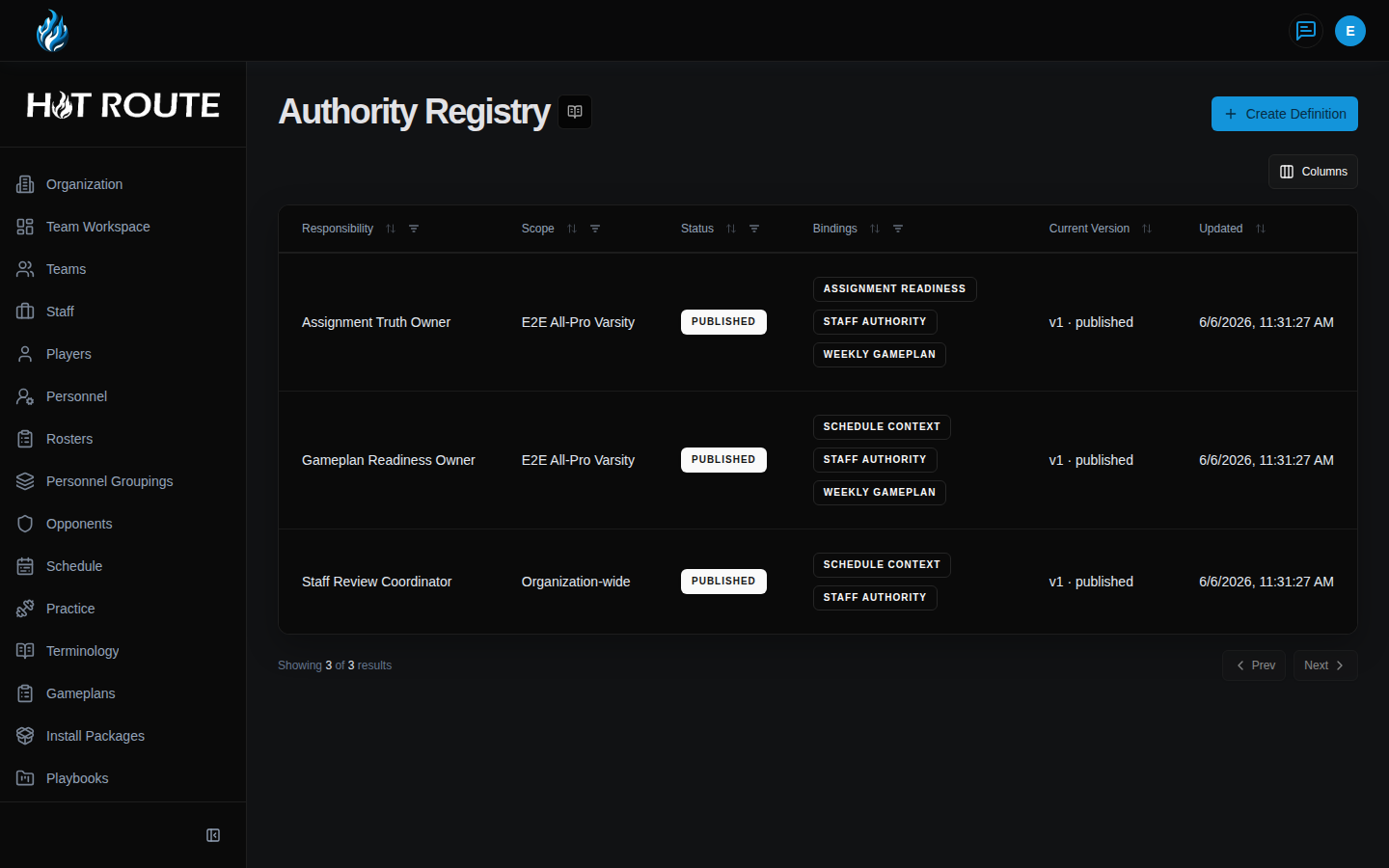
The active screen for this work is Authority Registry. The older /organization/staff-authority route sends owners and staff to that registry, so this guide uses the live registry labels that appear in HotRoute.
Use this page when the staff needs a shared definition for a responsibility such as schedule context, weekly gameplan readiness, assignment readiness, or staff-authority follow-up.
Who this is for
This page is for organization owners and trusted staff members who help define staff responsibility.
In football terms, this belongs to the people who answer: "Who owns this part of the week, and how will the rest of the staff know?"
What to know first
You must be signed in and linked to an organization before Staff Authority screens can load.
Authority Registry access is limited to organization owners and staff. If you do not have access, HotRoute shows recovery guidance instead of the registry.
Staff Authority is not the path for adding people to the organization. Use Invite Code when the next job is adding a coach, staff member, player, or guest.
Staff Authority is also not the path for outside systems. Use Manage Service Accounts when the next job is connecting an approved external tool.
Staff Authority is the organization-level source for responsibility definitions. Use Authority Workspace when the question is team-season responsibility coverage, Authority Roles when the question is reusable staff seats, and Authority Delegations when responsibility is being handed from one person to another.
How it works
The Authority Registry is a catalog of responsibility definitions.
Each row shows:
- Responsibility: the staff responsibility being defined.
- Scope: whether the definition is organization-wide or tied to a specific team.
- Status: where the definition is in its lifecycle.
- Bindings: which weekly readiness concerns can point to this responsibility.
- Current Version: the current draft or published version.
- Updated: when the definition last changed.
A responsibility definition moves through a review rhythm. Staff create a draft, refine it, submit it for review, and publish the reviewed version when it is ready to guide the organization.
The registry is the starting point. Team-season authority work can then use these definitions to assign coverage, review gaps, and coordinate delegations.
Open a registry row to reach the responsibility detail page, the live equivalent of /authority-registry/[id]. The detail page shows the responsibility status, scope, current version, team specialization, summary, structured details, weekly readiness bindings, and related usage. Use Authority Workspace Usage, Delegations, and Versions when you need to understand where a definition is used and how it changed.
Step-by-step instructions
- In the left navigation, click Authority Registry.
- If you received an older organization staff-authority link, open it normally. HotRoute sends /organization/staff-authority to the active Authority Registry page.
- Confirm the page heading says Authority Registry.
- Review the table columns: Responsibility, Scope, Status, Bindings, Current Version, and Updated.
- Click Columns when you need to adjust which table columns are visible.
- Click Create Definition when the staff needs a new responsibility definition.
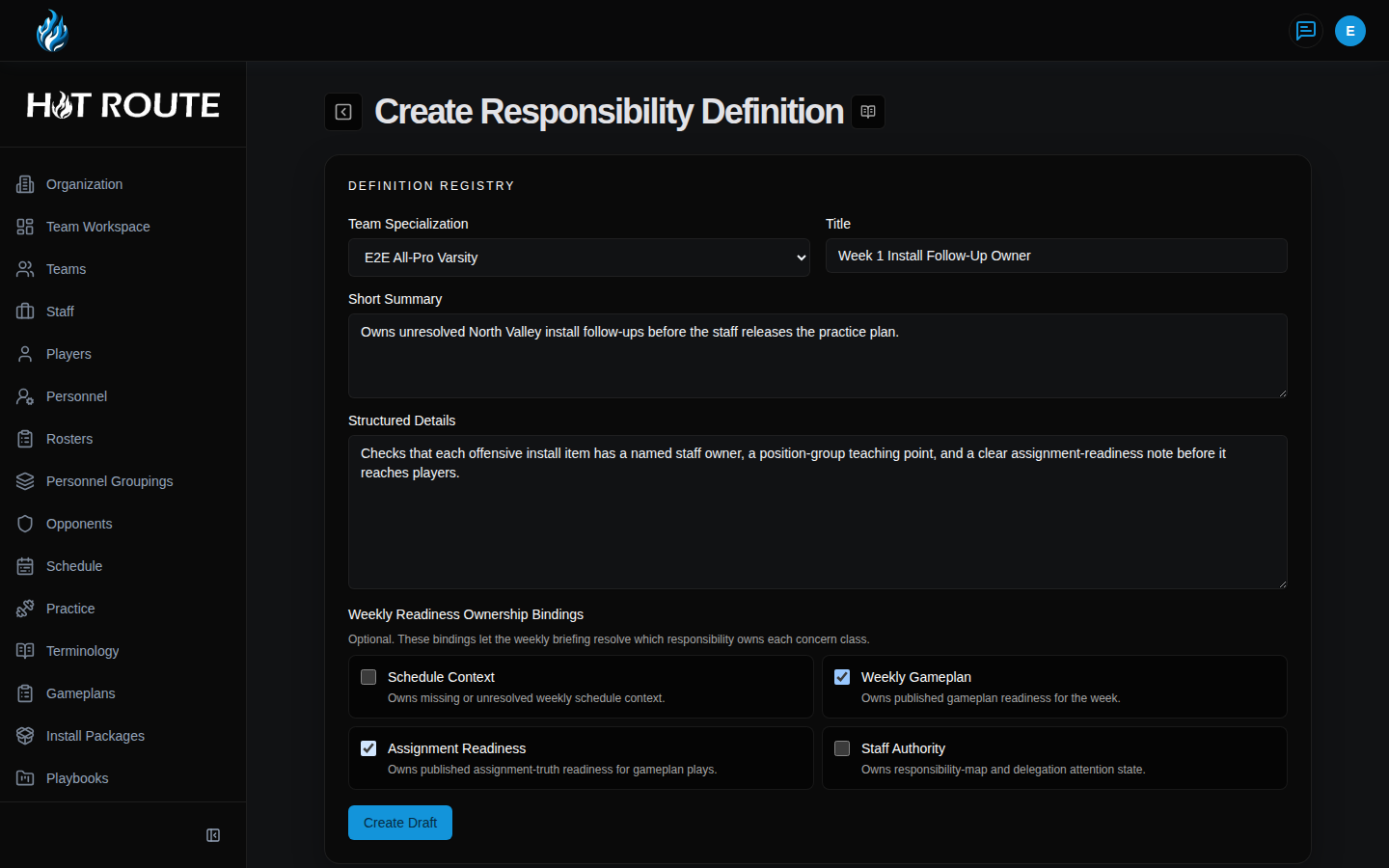
- In Team Specialization, choose Organization-wide unless the responsibility belongs to one team.
- In Title, enter the responsibility name in language the staff will recognize.
- In Short Summary, explain the responsibility in one or two staff-readable sentences.
- In Structured Details, add the details a coach or operator needs to understand when this responsibility applies.
- Under Weekly Readiness Ownership Bindings, check the weekly concern classes this responsibility owns.
- Click Create Draft.
- Open the new definition detail page after the draft is created.
- Review the detail fields, including Team Specialization, Title, Short Summary, Structured Details, and Weekly Readiness Ownership Bindings.
- Use Authority Workspace Usage, Delegations, and Versions when you need usage, handoff, or version context.
- Use Save Draft while the staff is still editing.
- Click Submit For Review when the definition is ready for owner or staff review.
- Publish the reviewed version only when the definition is clear enough to guide weekly responsibility.
What good looks like
A healthy Staff Authority setup makes responsibility easy to explain without a side conversation.
The owner or staff lead should be able to answer:
- What responsibility does this definition cover?
- Is it organization-wide or team-specific?
- Which weekly readiness concerns point to it?
- Is the current version still a draft, under review, or published?
- Would a new staff member understand who owns the work after reading the summary and details?
Common questions or mistakes
Why does /organization/staff-authority open Authority Registry?
That organization route is a legacy path. The active Staff Authority registry is Authority Registry.
Why does /team-workspace/staff-authority open Authority Workspace?
That team-workspace route is a contextual entry point. It opens Authority Workspace and carries the selected team and season when those values are present.
Should every staff job become a responsibility definition?
No. Create definitions for responsibilities that need shared accountability, weekly readiness ownership, or clear delegation. Do not turn every small task into a registry item.
What does Team Specialization mean?
It decides whether the definition applies across the organization or only to one team.
What are Weekly Readiness Ownership Bindings?
They tell HotRoute which responsibility owns a concern class in weekly readiness. For example, Schedule Context points missing schedule information to the responsibility that should resolve it.
Can non-owners use this page?
Trusted staff can access Staff Authority when their role allows it. Owner-only organization controls still remain owner-managed.
Related docs / next steps
Read Organization Standards when the next job is managing philosophy, identity, standards, constraints, or active adoptions.
Open Authority Workspace when the next job is reviewing team-season responsibility coverage.
Read Authority Roles when the staff needs reusable role language.
Read Authority Delegations when the work is an explicit responsibility handoff.
Return to Organization Configuration when the next job is owner setup, member access, invite paths, service accounts, or current season context.
Use Invite Code when the work is adding people to HotRoute.
Use Manage Service Accounts when the work is connecting an approved outside tool.