


Feature Guides
Plays
Learn how HotRoute plays move from playbook scope into inspectable play records, draft work, published versions, tags, and related objects.
Overview / Purpose
A play is a structured football object inside a playbook. It carries more than a name or diagram: it can connect to concept, system, tags, lifecycle, draft work, published versions, and downstream preparation.
Use play pages when the staff needs to create, inspect, or move from one play into its related football context.
Who this is for
This page is for coordinators, play designers, analysts, and staff members responsible for maintaining plays.
It is also useful for coaches who need to understand why a play is active, archived, draft-only, published, or related to a concept family.
What to know first
A play should start in the right playbook. The playbook supplies the team, season, and unit context.
Draft work and published versions are different ideas. A draft is working state. A published version is stable football truth that other surfaces can safely reference.
Tags should help the staff find and explain plays. Do not use tags as a substitute for the real playbook, concept, or system relationships.
How it works
This guide covers these routes:
| App route | What it is for |
|---|---|
/plays | List plays visible to the current account. |
/plays/new | Create a play inside an existing playbook. |
/plays/[playId] | Inspect one play, its playbook context, lifecycle, tags, and related object links. |
The play detail page is the best place to answer what the play is, where it belongs, and what staff context surrounds it.
Step-by-step instructions
- In the left navigation, click Plays.
- Review the list and use search or filters when available.
- Click a play row to open the play detail page.
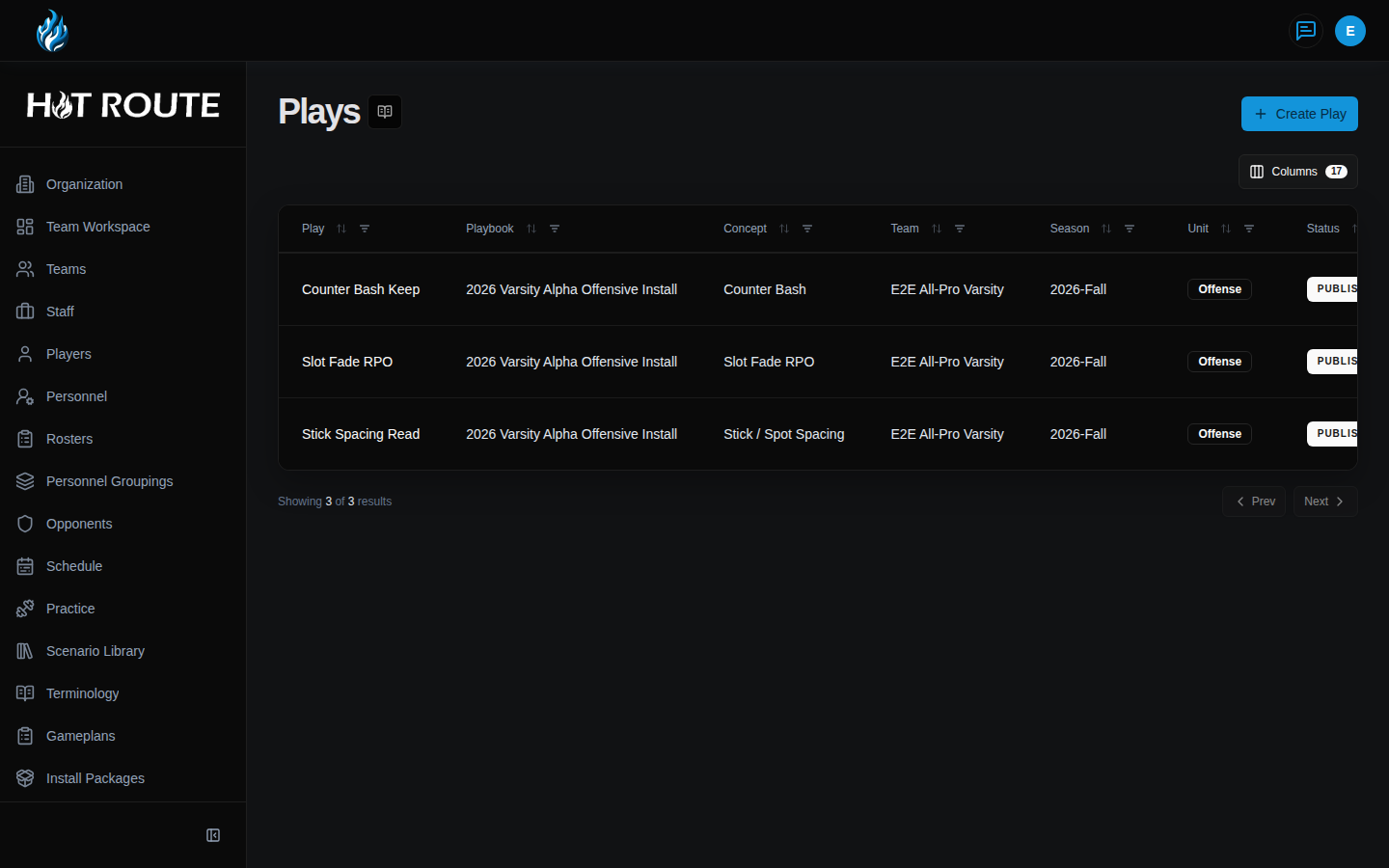
- Review the play name, unit, status, playbook, system, concept, formation, personnel, and tag context.
- Click related playbook, system, or concept links when you need broader context.
- Click Create Play when the staff needs a new play.
- On New Play, choose the playbook first.
- Enter a play name and football-readable description.
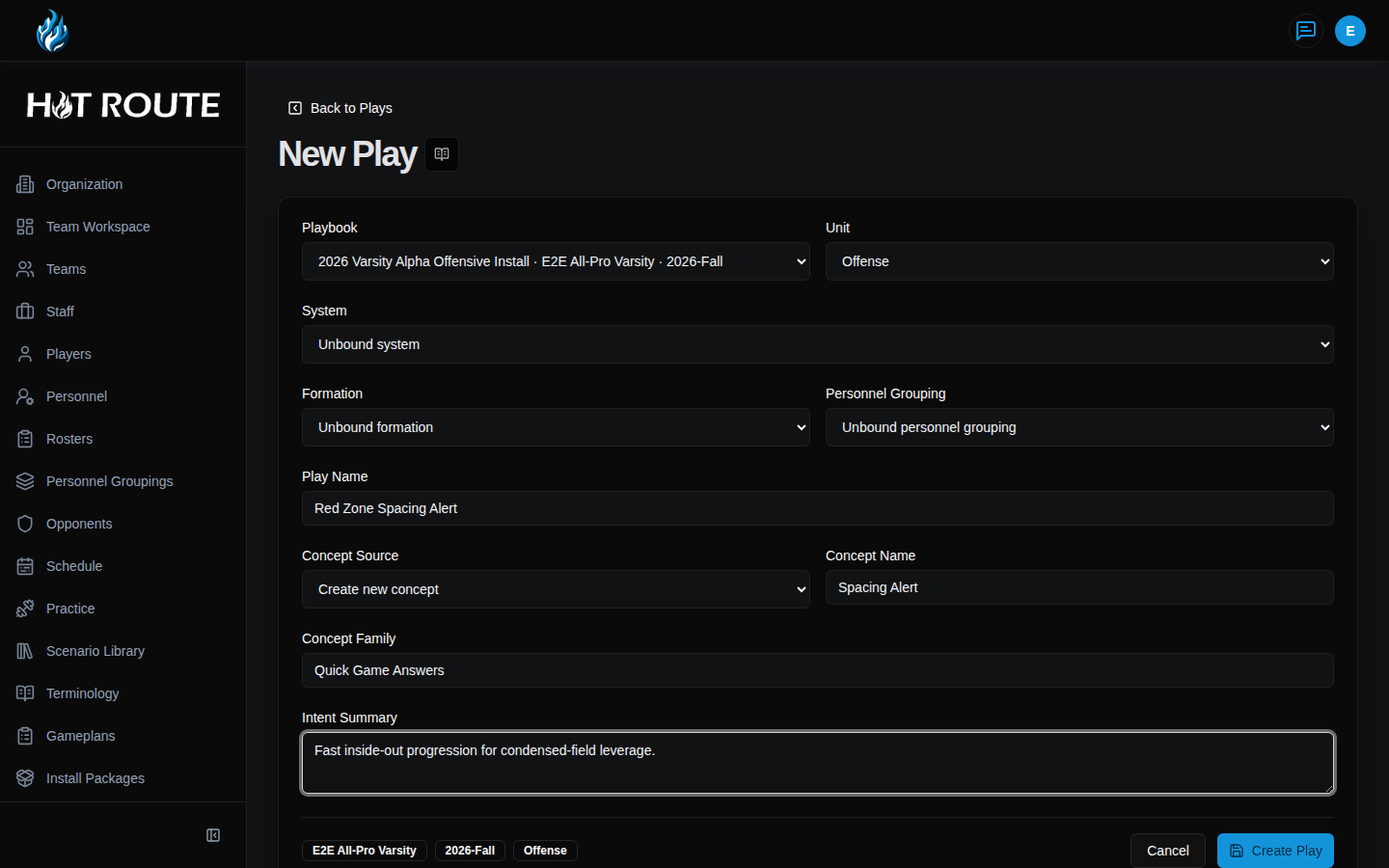
- Choose the system, concept, formation, personnel, and other structured fields when they are available and accurate.
- Save the play, then continue into the detail or designer workflow as needed.
What good looks like
A healthy play record is easy to inspect and teach.
Staff should be able to answer:
- Which playbook owns this play?
- Which system or concept explains it?
- Which tags help staff find it later?
- Is the play active, archived, draft, reviewed, or published?
- Which version should downstream work reference?
- What related objects should a coach inspect before teaching or changing it?
Common questions or mistakes
Is the latest draft always the version downstream work should use?
No. Cross-surface work should prefer pinned published versions or intentionally prepared snapshots. Drafts can change.
Can a play be useful before it is published?
Yes, but draft usefulness is narrower. Treat draft state as working context, not authoritative truth for downstream outputs.
Why does the play detail page link back to playbook objects?
Plays only make sense in context. The links help staff inspect the playbook, system, and concept relationships instead of reading the play as an isolated drawing.
Related docs / next steps
Read Playbook Manager when you need to see the play alongside its broader workbench context.
Read Play Grid when you want a more visual way to browse and group plays.
Read Retrieval and Search before using customer-safe search or agent citations around play content.